

User engagement is the key to success. If you manage to capture a potential customer's attention, it means you've just won a lead who is already well on the way to making a purchase!
One of the most-discussed - and most often misinterpreted - engagement metrics is bounce rate. Understanding what bounce rate is and how to analyze it lets you not only improve your Google rankings, but above all increase conversion on your site.
Table of contents
- 01 Bounce Rate - what is it?
- 02 How does bounce rate in GA4 differ from Universal Analytics?
- 03 How to reduce bounce rate?
- 04 Is a high bounce rate a reason to panic?
- 05 What to take away about bounce rate
01 Bounce Rate - what is it?
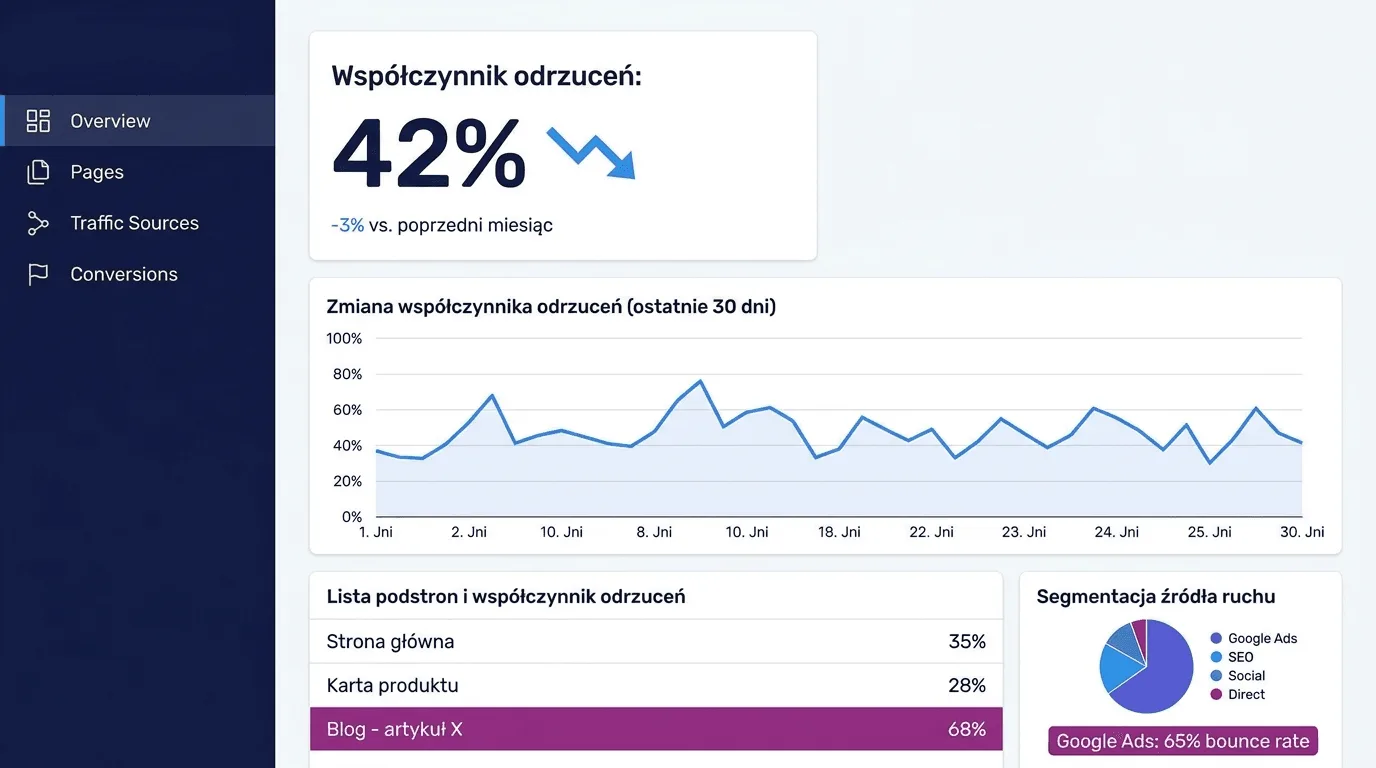
Put plainly, bounce rate is the rate of bounced sessions. It denotes the percentage of sessions in which a user entered your site and left it moments later, without any interaction.
The job of search engines is to provide the most relevant answer to a user's query and satisfy their intent as quickly as possible. If a user:
- Types a query into Google.
- Enters your site.
- Immediately closes the browser tab or clicks "Back."
Then, for analytics tools, that's a "bounce." A browser (like Google) concludes that the user didn't find what they were looking for on your site. It therefore interprets this as a poor match for the query - the result being that your site is shown less often for similar topics.
02 How does bounce rate in GA4 differ from Universal Analytics?
It's worth knowing that the definition of bounce rate has evolved. Many people searching for the answer to "what is bounce rate" land on outdated information.
- In the old Universal Analytics (UA): Every single-page visit (with no interaction) was a bounce.
- In Google Analytics 4 (GA4): Google changed its approach to something more precise and fair. Bounce rate is now the inverse of the engagement rate.
This means that in GA4 a session is NOT a bounce if it meets at least one of the "engaged session" conditions:
- It lasts longer than 10 seconds.
- It includes at least one conversion event.
- It covers at least two screen or page views.
Discover our solutions: AI-powered data analytics - get even more out of your data!
03 How to reduce bounce rate?
If your site's bounce rate concerns you, it may mean that users aren't finding what they were looking for, or the page is putting them off.
Here are a few methods for reducing bounce rate that you can implement right away:
1. Page load
Slow-loading web pages are the most common "killer" of conversion and the reason users hit "Back." If a page takes longer than 3 seconds to load , a large share of potential customers will lose interest and give up waiting.
What to do? Optimize your images, use caching, and check your site's score in Google PageSpeed Insights.
2. UX and site responsiveness
Today's customer is impatient - especially the one using a mobile device. If your site doesn't adapt to display on a smartphone, or is hard to navigate, and the buttons don't work - the user won't want to continue shopping.
Check how your site displays on different devices and screen sizes.
Read also: Customer experience (CX) and personalization - what impact does it have on the customer experience?
3. Watch out for pop-ups and ads
These are effective marketing tools - as long as you use them the right way. Nothing irritates users more than a pop-up window that springs up a second after they land on the page, covers all the interesting content, and can't be closed.
Good practice is to use pop-ups with tact: only after the user has scrolled 50% of the page, or on an exit attempt (exit intent).
Note: Google may penalize websites and cut reach for using so-called intrusive interstitials.
04 Is a high bounce rate a reason to panic?
Our answer: not always. Before you start looking for ways to reduce bounce rate, it's worth first examining the user's intent.
There are scenarios where a high bounce rate means the page is doing its job - the user got what they were looking for, quickly and without needless clicking. These include:
- Q&A pages, glossaries, recipes,
- Contact pages (e.g. with a phone number) that lead to a conversion.
Does Google frown on such behavior? No. If a user leaves your site but doesn't return to the search results (so-called pogo-sticking), the search engine concludes that their need was satisfied.
The bounce rate % on its own won't tell you whether things are good or bad. It's worth putting this data in context and using supporting metrics for analysis.
| Supporting metric | Interpretation when combined with a high Bounce Rate |
|---|---|
| Average time on page (Dwell Time) | High time + high bounce means the user read the page and most likely found their answer. Low time + high bounce is a bad sign, equivalent to the user "fleeing." |
| Scroll Depth | If a user scrolled 80% of the page and left - they read the content. If they scrolled 10% - the intro alone put them off. |
| Returning users | If the same users keep coming back (e.g. to a blog) but generate a high bounce rate, it may mean you have loyal readers and are building a loyal community. |
Note : If your Bounce Rate is below 10-20%, you almost certainly have an error in your tracking-code setup and this data isn't being collected correctly! It's worth verifying.
05 What to take away about bounce rate
The key to reducing bounce rate is putting yourself in the user's shoes. Check for yourself: Is the page fast? Is its content readable? Is the next step easy to find?
If you want to keep customers on your site longer - get in touch with the Persooa team! Together we'll increase your store's ROI in just 90 days.